> For the complete documentation index, see [llms.txt](https://help.cosmobots.io/help/llms.txt). Markdown versions of documentation pages are available by appending `.md` to page URLs; this page is available as [Markdown](https://help.cosmobots.io/help/outros/exemplos-de-codigos-javascript/validador-de-resposta-a-templates.md).
# Validador de resposta a templates
É possível configurar um validador dos botões configurados no Template, por meio de um JS.
### Modo de Configuração
1 - Copie o código abaixo e coloque ele no seu Fluxo de Boas Vindas.
```javascript
var resposta = context.cur_msg && context.cur_msg.text
resposta = String(resposta)
if (resposta === "Botão 1" || "Botão 2") {
context.aceitado = 'ok';
context.resposta = resposta
console.log("passei")
}
else {
context.aceitado = "nok";
}
```
2 - Após isso crie um filtro onde ele irá validar o **context.aceitado**.
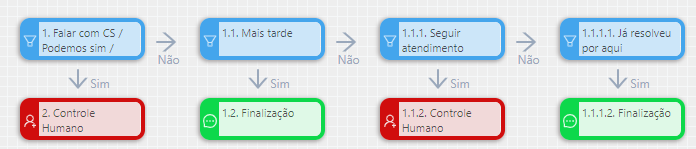
3 - Em seguida crie um Novo Fluxo à direita do filtro citado acima.
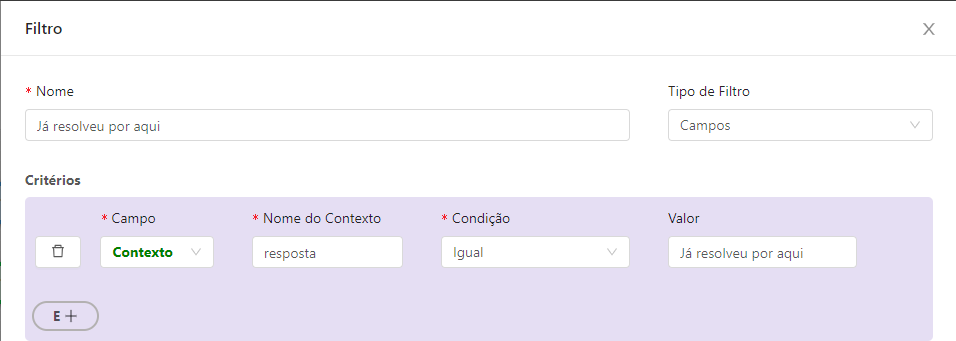
Nesse Novo Fluxo, você irá criar alguns filtros conforme a ação de cada botão. Onde ele ira validar os botões com a variável **resposta.**
4 - Configure a ação correspondida àquele botão embaixo de cada filtro.